-
Robot
Most Wanted

- Rep Power
- 82
 Microsoft Extends Dark Mode to File Explorer, Revamps Start Menu in Wi
Microsoft is rolling out a noticeable update to Dark Mode in Windows 11 with the latest Insider Preview pushed to the Dev Channel. Build 26220.6772 applies dark theming to a range of File Explorer interactions that have long stuck out as bright exceptions: dialogs that appear when copying, moving, and deleting files now match the system theme, context menus honor dark mode, progress bars and file-selection windows adopt the darker palette, and replacement or confirmation prompts are no longer glaringly light. Microsoft also made some subtle layout and behavior adjustments to menus, so the experience reads as a unified whole rather than a patchwork of old and new interfaces.
Taken together, these changes address a persistent complaint that has followed Windows for nearly a decade: the operating system's dark theme has repeatedly been undercut by legacy UI elements that did not receive the same styling attention. Windows still contains legacy components. For example, certain Properties windows, the Run dialog, and parts of Control Panel may remain in light mode until Microsoft either modernizes or replaces their underlying code. By releasing the change to Dev Channel insiders first, Microsoft is inviting power users and testers to exercise everyday workflows and report edge cases, so the company can refine behaviors before considering Beta and Stable rollouts. That said, this does not complete the work. Achieving true visual cohesion will require continued attention to legacy paths and a steady stream of smaller updates.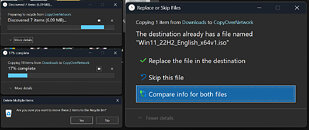
More...
 Posting Permissions
- You may not post new threads
- You may not post replies
- You may not post attachments
- You may not edit your posts
-
Forum Rules


