Reply With Quote
Nu te apuca sa pui oscam pe ruter decât dacă găsești OscamWrt!

 Thanks: 4
 Likes: 1
 Dislikes: 0


O traducere aproximativă de pe linkul de mai sus am înțeles așa:
Se instalează softul routerului flash și cred că acolo este deja oscamul pus.
Deci, din nou, pentru a lua notițe
1.) Flash Facory Image
2.) Resorez setările
3.) rm -r / overlay / etc / opk *
4.) reboot
Sau mai întâi 3.) și apoi 2.)
LA TOTI NI-I GREU, DAR NU LA FEL
"SGU Stargate Universe"

Nu te apuca sa pui oscam pe ruter decât dacă găsești OscamWrt!
Sh40, AML, prime focus 1,5m si altele ...

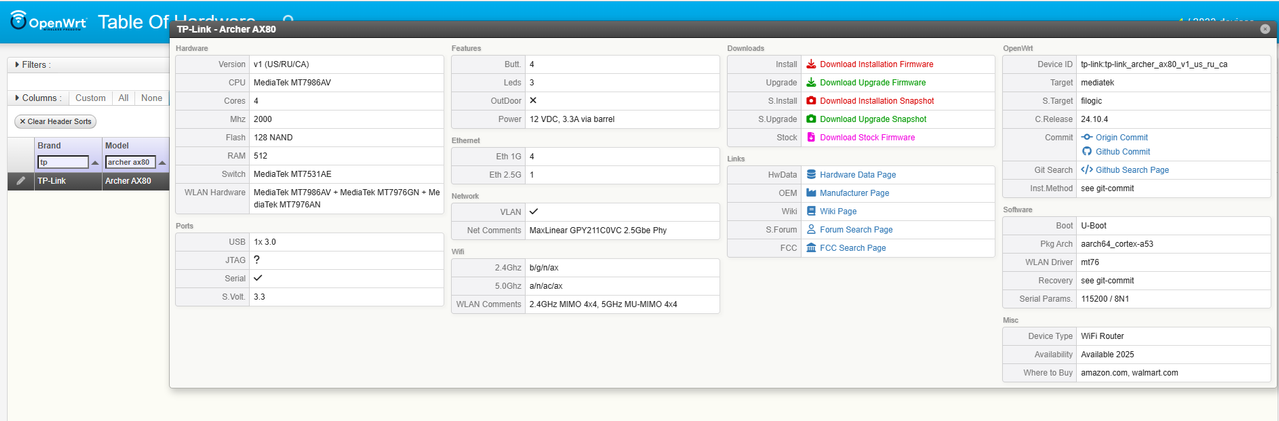
Buna colegi, merita cumparat pentru server oscam? Router Wireless TP-Link Archer AX80 AX6000 1x 2.5 Gbps WAN/LAN 1x 1 Gbps WAN/LAN 3x Gigabit LAN 1x USB 3.0 2.4 Ghz/5 Ghz Dual Band WI-FI 6
https://www.speedtest.net/result/10703426599.png
Am cautat pe google daca are suport OpenWrt, raspunsul e mai jos:
Rezumat generat de AI
Yes,
the TP-Link Archer AX80 AX6000 can be run with OpenWrt, but support is still developing and may require specific steps for certain versions. Official support is available for the US/RU/CA versions (V1), with details and downloads on the OpenWRT Wiki. Some users have reported success with the EU version as well, but it may require building or modifying the firmware.
Version support
- US/RU/CA V1: Officially supported, with details and firmware available on the OpenWRT Wiki.
- EU Version: Support is available through recent commits, but may not be in the standard release. Users have reported successfully installing it, though it may require manually building or applying specific firmware commits.
What to know before installing
- Installation: You can find the necessary files and installation instructions on the OpenWRT Wiki for the US/RU/CA version. For the EU version, you may need to follow specific threads on the OpenWrt Forum.
- Known issues: Some users have reported minor issues, such as certain LEDs not working, physical LAN ports having problems, or the need to bypass certain factory settings to restore stock firmware.
- Documentation: Before you begin, carefully read all documentation on the OpenWRT Wiki and the OpenWrt Forum to understand the process and potential issues.
- Backup: It is strongly recommended to back up your current router configuration before attempting to flash custom firmware.
Sh40, AML, prime focus 1,5m si altele ...
Cauta un router sa fie compatibil 100% cu openWRT : https://openwrt.org/start?q=TP-Link+...6000&do=search.
https://www.speedtest.net/result/10703426599.png

Personal recomand fritz!box Freetz-Image mit oscam build by Freetz
De la 7270 pana la 7590 am avut de mulre modele mod freetz pentru oscam.
..::EGAMI TEAM::..

Uite o mana de ajutor ...
Pentru configuratia ta ...
Oscamul potrivit este acesta ...
Download : https://mega.nz/file/js1CQAxZ#mfMrQR...pw8tYtl5gDEsAA
Mai ramane o nimica toata ... sa-l instalezi si sa-l faci sa porneasca odata cu routerul !
Citeste aici ... precis o sa-ti fie util : SATELLITE SUPPORT - View topic - Proiectul router Netgear ca server Emu
 Posting Permissions