Results 1 to 15 of 17

Thread: MediaArt7 - First Android Satelit Hybrid Set Top Box

Hybrid View

Previous Post Previous Post   Next Post Next Post
  1. #1
    Moderator sorin8m's Avatar
    Join Date
    22 Apr 2007
    Location
    Romania, Timisoara (Westul salbatic)
    Posts
    1,898
    Mentioned
    0 Post(s)
    Rep Power
    83

    Default MediaArt7 - First Android Satelit Hybrid Set Top Box


    Full Compliant with DVB-S2
    Powerful Media Player
    Full Browsing with Flash Player Stable Streaming Protocol
    Application Market
    DLNA / Air Video

    Features and Strong Points

    1. World first Android Hybrid STB

    • World-first Android-based Satellite

    Hybrid set-top box.

    • World-first Smart Satellite Hybrid functionality.

    • Screen capture supported.

    2. Full browsing with Flash like PC

    • World-first Adobe Flash 10.3 certificate

    & plug-in (Full browsing).

    • Fast page loading, scrolling and zooming functions by RCU.

    3. Powerful media function

    • Various media codecs and container supported.

    • Powerful iMedia Player application.

    4. Powerful streaming protocol

    • World-first Android-based Adaptive HLS (HTTP Live Streaming) support.

    • Multicast / HLS VoD / HLS Live / HTTP

    VoD support.

    5. DLNA & Air Video

    • Contents sharing with PC, Smart Phone/ Pad, TV and so on.

    • DLNA 1.5 Compliant.

    6. Compliant with Android

    Applications

    • All kinds of Android applications are running with no modification.

    • APK Installer and Application Manager

    supported.

    7. Various Interface

    • USB, HDMI, AV OUT, ETHERNET, and

    Wireless LAN supported.

    • USB devices, Mouse, Keyboard supported.

    8. Application Market

    • Application Market Framework.

    • Application Market Server.

    9. OTN (Over The Network)

    • Automatically detect for the new software.

    • Easy to upgrade via Network.

    10. Pre-installed Android

    Applications

    • Browser, iMedia Player, YouTube, Weather Widget, HLS Player, Game, APK Installer, Music Player, DLNA, All STB Applications up, Facebook....


    Caracteristici:

    Operating System - Android
    Android Version - 2.7
    Chipset - ARM Cortex-A9
    Flash Memory - 512MB NAND
    Program DRAM - 512MB DDR2
    Flash - Adobe Flash Plug-in10.3 (up to 480i video)
    Wireless - Dongle type (separately-sold)
    F/W Upgrade - OTN (Network Upgrade)

    Tuner
    - FEC Modes Rate
    - 1/2, 2/3, 3/4, 5/6, 7/8
    - Input Connector
    - F type female (75 Ohm)
    - Frequency Range
    - 950MHz ~ 2150MHz
    - Symbol Rate
    - 2 ~ 45 Mbaud
    - Demodulation
    - QPSK/8PSK

    Codec
    - Video
    - MPEG 2, MPEG 4/H.264
    - Xvid, AVI, MKV
    - On2,
    - Audio
    - MP3, Sorenson, ACC, OGG, MPEG Audio
    - Photo
    - PNG, JPEG, BMP

    Front LED
    - Power LED (Red/Green)

    Rear Output Connectors
    - 2XUSB 2.0 host
    - HDMI 1.3a
    - ETHERNET
    - COM (Option)
    - AV OUT (Option)

    Dimension
    - ( W ) 180 mm x (D) 130 mm x (H) 30 mm


    Channel:

    RED button. Displays channel list. Alphabetical and satellite sorting. Changes the channel.
    Settings the “Add to FAVORITE”, “Lock”, or
    “Unlock”.

    Favorite:

    YELLOW button. Displays favorite list.
    You can remove the favorited items (Channel, App and Browser) setting.

    Internet:

    BLUE button. Displays bookmark list. You can add “FAVORITE” menu.
    Auto screen capture supported.
    Cursor and virtual keyboard supproted.
    Easy to recognize bookmarks with thumbnail images

    Screen capture:

    Press “«” button for 3 seconds for screen capture. ( Video screen capture is unavailable.) Captured image will replace the application icon image. Captured image is automatically saved into the external storage and you can check it with iMediaPlayer.

    YouTube:

    Enjoy all of HD movies on YouTube. Selects “YouTube” on APP menu.

    Internet Browser:


    iMedia Player:


    WHITE button. Displays EPG for 7 days. Alphabetical and satellite sorting. Displays the program information..
    Last edited by sorin8m; 13-03-13 at 22:07.

  2. #2
    Standard RSP member stargate's Avatar
    Join Date
    23 Apr 2007
    Location
    P3X-888
    Posts
    3,754
    Mentioned
    0 Post(s)
    Rep Power
    108

    Default

    Interesant

    Nota: Vizionarea programelor Pay TV fara un abonament valabil este ilegala
    Discutiile purtate si fisierele disponibile aici sunt ?n scop experimental si educational !

  3. #3
    Moderator sorin8m's Avatar
    Join Date
    22 Apr 2007
    Location
    Romania, Timisoara (Westul salbatic)
    Posts
    1,898
    Mentioned
    0 Post(s)
    Rep Power
    83

    Default

    Accesorii:

    - USB wifi


    - Tastatura si telecomanda cu atingere


    - Tastatura și mouse-ul fără fir (aveți posibilitatea să conectați orice tastatura și mouse-ul fără fir, care este compatibil cu Android)
    Last edited by sorin8m; 13-03-13 at 23:31.

  4. #4
    Golden Member qwess's Avatar
    Join Date
    26 Oct 2009
    Location
    Walachia / Paname
    Posts
    823
    Mentioned
    2 Post(s)
    Rep Power
    69

    Default

    aplicatii .apk prezente in download pe site-ul oficial

    http://mediaart.cc/index.php/downloa...plication.html

    pret:179,90 €
    http://digitaldream.info/shop/en/61-media-art-7


    Azbox HD with OpenSPA 3.0 powered by OSCam
    UE46F8000 powered by SamyGO_OSCam


  5. #5
    Moderator sorin8m's Avatar
    Join Date
    22 Apr 2007
    Location
    Romania, Timisoara (Westul salbatic)
    Posts
    1,898
    Mentioned
    0 Post(s)
    Rep Power
    83

    Default

    Ca sa puteti instala de pe google play aplicatii trebuie sa urmariti urmatoarea procedura de instalare.

    Instalare GooglePlay pe MediaArt7:

    1. In primul rand pentru a putea instala googleplay trebuie sa aveti cont pe gmail

    2. Descarcati GooglePlay de pe pagina www.mediaart.cc

    3. Mergeti in sectiunea Download si dupa aceea Appk Download, cum e aratat in poza


    4. Luati GooglePlay apasand butonul download sau Mirror1


    5. Dezarhivati si copiati totul pe USB memory stick

    6. Introduceti USB memory stick in una din cele 2 USB-uri din spatele receptorului


    7. Dupa aceea apasati butonul MENU pe telecomanda si alegeti folderul APP


    8. In meniul APP gasiti APKInstaller


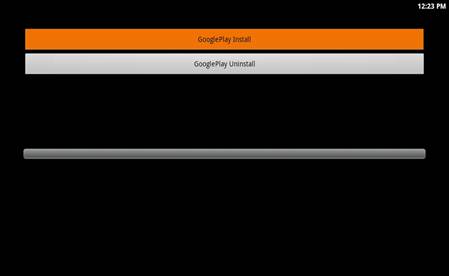
    9. Deschideti APKInstaller si vor aparea urmatoarele 3 aplicatii


    10. Obligatoriu sa aveti grija de ordina de instalare
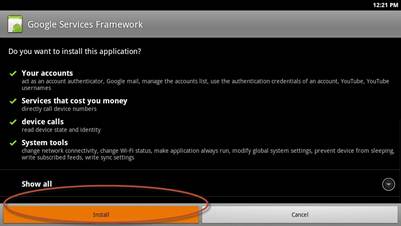
    11. Prima data instalati GoogleServicesFramework.apk


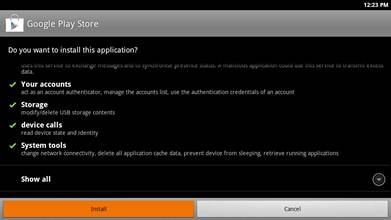
    12. Instalati GooglePlay Enabled ..
    Deschide aplicatia GooglePlay Enabled si apasati pe GooglePlay Install


    13. Dupa ce ati terminat cu instalarea lui GooglePlay este nevoie sa resetati receptorul MediaArt7
    Apasati butonul Power si il tineti mai mult de 3 secunde dupa care il porniti apasand butonul Power


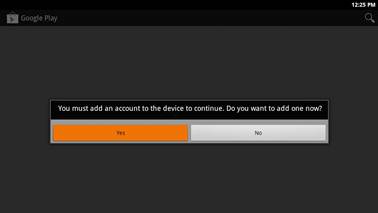
    14. Dupa ce porneste receptorul gasiti in meniul APP programul PlayStore


    15. Porniti PlayStore si apasati pe YES ca si in poza de mai jos


    16. Apasati butonul NEXT


    17. Daca deja aveti cont pe gmail apasati butonul Sign In, daca nu atunci trebuie sa va faceti un cont prin apasarea butonului Create


    18. Introduceti datele de la gmail (userul si parola)


    19. Daca ati introdus bine datele atunci va va aparea Finish Setup, cum se vede in poza de sub


    20. Google Play este cu success activat si instalat, acuma puteti lua programe de pe google play si instala pe receptor.

  6. #6
    Moderator sorin8m's Avatar
    Join Date
    22 Apr 2007
    Location
    Romania, Timisoara (Westul salbatic)
    Posts
    1,898
    Mentioned
    0 Post(s)
    Rep Power
    83

    Default

    Exista si reprezentanta in timisoara care vinde astfel de receptoare la 220Euro cu tot cu tva. Pentru firme pretul la an gro e mai mic.
    http://www.artsatmedia.com/
    Last edited by sorin8m; 25-03-13 at 21:21. Reason: corectie

  7. #7
    Moderator sorin8m's Avatar
    Join Date
    22 Apr 2007
    Location
    Romania, Timisoara (Westul salbatic)
    Posts
    1,898
    Mentioned
    0 Post(s)
    Rep Power
    83

    Default IPTV pntru MediaArt 7

    IPTV pentru MediaArt 7


    DOWNLOAD IPTV MediaArt7

    - EXYU Channel
    - ROMANIA Channel

    - Fix FTP root
    ( Asta este doar inceputul, in curand mai multe canale )

    OBSERVATIE : Ca iptv sa functioneze corect este necesar sa aveti FirmWare minimum 2.7.3, dupa care urmariti etapele urmatoare


    1. Meni - App - IPTV (No channel List)
    2. Porniti IPTV MediaArt7
    3. Introduceti IP adresa mediaart7 in IPTV mediaart7 program ( la PC )
    4. Dati klik pe canalele iptv dorite
    5. Asteptati ca procesul sa termine
    6. Iesiti in meniul principal si intrati din nou in IP aplicatie, canalele selectate anterior pe PC vor fi afisate.


Posting Permissions

  • You may not post new threads
  • You may not post replies
  • You may not post attachments
  • You may not edit your posts
  •